Showing posts with label JAVA. Show all posts

Tuesday, September 04, 2012

Java is based on reason, like Humanism. :)

I read this funny post "if programming languages were religions..." over here , and couldn' t help writing the rebuttal below with regards to its characterization of Java:

Totally wrong on Java. See, some people -often whom have never used it- continue saying Java "is dead", "is so 1990s" yet, Java continues being relevant ever more each day, and is now free (GPL open source, OpenJDK). Then some said Java was going to die after the Oracle acquisition of Sun Microsystems, they were proved wrong once again, with Oracle investing in Java, opening OpenJDK even more, making JavaFX open source (OpenJFX), making OpenJDK the reference implementation of JDK7, and even getting IBM, Apple and Twitter aboard the OpenJDK project. Plus, Apple donated its OSX JRE code to OpenJDK as well.

So does it make it like "fundamentalist christianity"? don' t think so, more like humanism...

See, Java is NOT ONLY a programming language, Java is actually 3 things: a programming language, a virtual machine, and a level playing field software ecosystem. So you can write cross platform Java apps without even writing a single line of Java source code, thanks to dynamic languages that run atop the Java VM. That' s why there' s JRuby, Jython, xRuby (ruby to java bytecode compiler), Scala, JGo, NetRexx (open source REXX for the JVM - www.netrexx.org), and you can even write Java apps with Basic, thanks to Jabaco (www.jabaco.org).

So, in the end, Java understands that all the people has its own beliefs, and people of all beliefs are welcome to come to the Java VM, which is based on the rational belief that "porting code"  from one OS to another is silly, and that all apps should run on all OSs. It' s based on reason, like humanism.

;-)
FC

Wednesday, August 15, 2012

Reader´s feedback says sometimes I´m not full of sh..

It´s really nice when you write a news story and someone writes back, months later, "from inside" -a big corp- saying "hey you hit the nail on the head".

 Photo courtesy (CC) of Marco Repola @ IStoleThe.TV

I wish that came back more often, but I guess that also means I hit the nail on the head only once a while. ;)

This was my story on Oracle´s decomission of "Sun Download Manager"
http://news.techeye.net/software/oracle-quietly-buries-sun-download-manager

And this the feedback the story got, posted by the SDM product manager Gary Zellerbach:

--------------------------------------------------------------------------------
12 Aug 00:42

Hi Fernando, I was the co-inventor and Product Manager of Sun Download Manager (SDM) from its inception (~2001) until its recent "retirement." I was surprised to see this article -- frankly, I wasn't sure if anyone had noticed, but obviously you did! 

You seem very perceptive and make some salient points. For the record, I believe the main reason SDM was discontinued was due to lack of engineering resources to update it. As you pointed out, first there was the the desire to rebrand it as "Oracle Download Manager." More importantly, as you also noticed, was the lack of HTTPS support, which was not a problem on the Sun Download Center, but meant that SDM simply did *not* work with Oracle's primary product download site. That was a serious issue. 

To be fair, there was interest expressed in updating SDM and a desire for Oracle to have a good download manager for its customers, but when push came to shove, it was deemed there were higher priority needs for the download engineers. Soon after SDM was retired, my brief stint at Oracle came to end as well. I understand the need to prioritize resources but did not agree with the lack of communication. I wanted to post a blog with a heads-up and explanation about why it was being discontinued. But I was advised not to by my management, as it is company policy not to pre-announce product changes. The most I could do was to insist that customers not get a 404 when hitting the former SDM web pages, and so I got a redirect put in to the FAQ you saw. 

Now I see the redirect appears to have been removed too. (BTW, while the redirect is gone, the FAQ is still available here: http://www.oracle.com/technetwork/indexes/downloads/sdlc-faq-091624.html ) I can't disagree with much of your editorial perspective, though hopefully my comments help fill out the background.

I don't know Oracle's future plans as to whether they'll ever offer another download manager. I do know, though, that SDM had a great run, was downloaded and used literally millions of times, saved Sun a ton of money on bandwidth and support costs over the years, and was a great example of Java programming. Thank you for noticing it disappeared. -------------------------------------------------------------------------------- 

What can I say, thanks to you, Gary, for the kind words and taking the time to write back, confirming some of my perceptions from afar.

FC

Thursday, April 12, 2012

How to run .jnlp Java Web Start JWS apps with OpenJDK Java on Linux and Firefox

In the Windows world, Java Web Start apps run "automagically". That is, if you install Java, that' s all there is to it.


 The Sun/Oracle Java Runtime install takes care of installing the Java runtime, the Java plug-in (for all browsers on the system), and also the required bits to run Java Web Start (javaws.exe). So when you click on a .jnlp link on a web page to launch a Java desktop application, the app just starts, you se the Java splash screen, and seconds later, the app pops up.

(If it is the first time you run an app from such vendor, a security dialog comes up asking if you know and want to trust that developer and its cryptographic signature from that dev going forward, or just authorize it this time, or cancel -not run it-).

In the Linux world, Java (as the GPL Open Source project it now is) is called "OpenJDK". But if you install OpenJDK alone, you don' t get the "Plug-in" (the component needed to run applets inside a web browser AND Java Web Start apps).

For that, -the Java Plug-in- you need "IcedTea" which is the name given to the Java Plug-in that goes along with OpenJDK.

Why they choose to confuse the user with two different package names is beyond me (actually, I know why, it has to do with the project's history, but that' s of no interest to end users). If you ask me, Icedtea should be renamed to "OpenJDK-plugin".

But that is besides the point.

Having said that, -please have patience- here' s the solution to run Java .jnlp on Firefox on Linux.

1. You need to install "Icedtea".
OK, so you installed Icedtea, clicked on a Java Wesbtart app launcher link (.jnlp) and got an odd dialog from the browser asking what do you want to do with the .jnlp file?.


Don' t despair. That happens because while you have:.

1. A functioning JRE installed (OpenJDK)
2. A functioning Java plug-in (IcedTea) installed,

... that the Icedtea installation has NOT configured Icedtea as a browser "helper app" to appropiately launch JNLP files.

So how do you fix it?!??!?! Simple: ;-)

1. Select "Open With" and instead of the default app (ie Fedora wants to open .jnlp links with gEdit), click on the app name to "choose another"
2. Then navigate to /bin and select "javaws'
3. Select "Do this automatically for files like this from now on"
4. Click "OK"

...the Java app will launch.


And from that point on, all Java Web Start apps will run when you click on the launcher link.

(again, the first time you run any given app you' ll have to authorize it, but not from that point onwards if the crypto signature is maintained).


Does this need to be so irritatingly complex? of course not.

The problem is that the Icedtea developers think about things like developers, not end users. :-(

FC
PS:Oh, did I mention my favorite Java Web Start apps? There's a lot, but you should start by taking a look at http://ho.io/mu-commander and http://ho.io/JShot

Tuesday, April 06, 2010

Gavin Clarke is an utter moron, once again

[I wrote the following to The Rogister's Gavin Clarke, the anti-Sun, anti-Java pundit always too happy to write something to smear Sun, or now, trying to muddy the Java landscape a bit more]

"In many ways, IBM succeeded. Eclipse became a more widespread and grass-rootsy movement than the top-down, closed-shop style of the JCP that alienated technology creatives. In pure market share, Eclipse become the preferred open-source IDE for Java developers."

You´re an utter moron, I´m convinced now. WTF does JCP, an enhancement-request process, has to do with Eclipse, which is an IDE?.

Sun has its own ide, Netbeans, and in any case, it´s as succesful -if not more- than Eclipse, why? Because it´s cross platform, it's written in Java itself, and it includes everything developers need, unlike Eclipse which needs commercial "plug-ins" for many things.

FC

Friday, August 03, 2007

JAR is a bitch, and then you die!

[WARNING: This is geeky stuff, if you're NOT a computer geek, then scroll down to the next post. Move along, nothing to see here!]

Instead of the old adage "Life's a bitch, and then you die" I propose a new version: "JAR is a bitch, and then you die".

In case you're living in a bottle or you're not a geek, JAR is the Java JDK tool used to build the compressed ".JAR" (Java Archive) files that contain a Java software application (all the different binary files inside it). It's a tiny command line application just like everything in the JDK that should be no different or more complex to use than ZIP or tar.

However, it proved to be a real pain in the ass and a TIME WASTING EXERCISE, just to update a SINGLE TEXT LINE inside an existing .jar file's "Manifest".

1. What I wanted to do:
Unpack an existing application,
update its MANIFEST file, to include the "Main-Class: ClassnameHere" statement, so I could just start the application by typing

java -jar applicationname.jar
instead of using the author's ancient approach of having to name the "Main-Class" on the command-line every time...

java -classpath applicationname.jar LongNameofTheStupidStartupClass
2. I unpacked the existing application's .jar file just fine with 'unzip', and created a text file with my favorite text editor which read:

Main-Class: LongNameofTheStupidStartupClass

I saved it as "./manifestinfo.txt"

3. So, not having used jar before, I go to a tutorial I find online here

http://java.sun.com/docs/books/tutorial/deployment/jar/modman.html

which reads

"The basic command has this format:

jar cfm jar-file manifest-addition input-file(s)


...and thinking I know what I'm doing, I type:

$ jar -c jftpd.jar ./manifestinfo.txt ./ ./ftpserver/*


I get this as a result:


4. I had to close the terminal as I couldn't type anymore (I could type but I couldn't understand anything).

Then I found what I think is a more friendly explanation on how to update the "Manifest" of the .JAR file with new info, over HERE:
http://java.sun.com/developer/Books/javaprogramming/JAR/basics/update.html

(Later I realize that what happened in Step#3 was that I forgot to include the "f" parameter to indicate that I wanted output to a file rather than to STANDARD OUTPUT. What the **** is the purpose of having output of JAR to standard output?? I don't get it).

5. So I type
jar cf jftpd.jar ftpserver/*
and IT WORKS!
But I forgot about the new manifest info... so I type:

$ jar umf ./manifestinfo.txt ./jftpd.jar
...and I get this beauty:

java.io.IOException: misplaced continuation line
at java.util.jar.Attributes.read(Attributes.java:374)
at java.util.jar.Manifest.read(Manifest.java:182)
at java.util.jar.Manifest.(Manifest.java:52)
at sun.tools.jar.Main.update(Main.java:481)
at sun.tools.jar.Main.run(Main.java:184)
at sun.tools.jar.Main.main(Main.java:1022)
[fcassia@m6810 tmp]$

WHAT THE F#CK IS GOING ON NOW????????

6. You know what was the problem? the file "manifestinfo.txt" had TWO BLANK SPACES before the text "Main-Class: ..." and TWO BLANK LINES below it !! (I pressed [Enter] twice).

Apparently, JAR FREAKS OUT (this is JAVA 6.0 update 2 JDK's JAR, for crying out loud!).

7. I removed the two leading spaces and trailing blank lines and guess what? IT WORKED!.

[fcassia@m6810 tmp]$ jar umf ./manifestinfo.txt ./jftpd.jar
[fcassia@m6810 tmp]$

8. Done.... BASTARDS!!

9. Another Golden Rule when dealing with JAR:
JAR NAME APPARENTLY ALWAYS GOES LAST.

So, contradicting what would be the 'zip' usage of "hey zip, I want to update THIS ZIPFILE with THIS_DATA" (zip something.zip newfile.txt) in JAR is totally the opposite way: "hey JAR, I want THIS NEW FILE into THISJAR" (jar umf newdata ./intothisjar.jar).

GRRR

And finally, found this thread
http://forum.java.sun.com/thread.jspa?threadID=549376

See comment #11:
"
The JAR tool is rather finicky. I have found that each HEADER:VALUE pair must be separated by a newline but not more than 1 newline. When I tried putting blank lines in the MANIFEST, I would get "Error: failed to load Main-Class attribute...". Sun needs to update their tutorials or fix this problem with the JAR tool's manifest parser."

FINICKY? That's being mercyful...

and then comment #15:

"One diference between unix and windows' file system is that text files in unix always have a final linebreak at the end of the file, while windows doesn't need to.

Java, being developed by Sun primarily for the unix comunity requires that the
manifest file ends with a new-line.

no new-line, no manifest file."

!!!!!!!!!!!!!!!!!!!!!!!!!!!!!!!!!

Want more? See the comments on page #2 of the above thread at Sun.com, discussing the "joys" of the "jar" command:

===================================
Does this instruction really work???

http://java.sun.com/docs/books/tutorial/deployment/jar/appman.html

They specify the following command:
jar cmf MyJar.jar Manifest.txt MyPackage/*.class

When I tried that with my classes and files (with different names, of
course), it didn't work. What worked for me is equivalent to the
following:
jar cmf Manifest.txt MyJar.jar MyPackage/*.class

The order is simply permuted. Maybe it's just Apple's Java
implementation. Is this what you were asking about?

-jonnie

==================

The Tutorial is wrong. It should be jar cfm, not cmf.
The order of the command must match the order of the parameters.

==================

Thank you. That is good to know.
===================================

I REST MY CASE:

JAR IS A BITCH, AND THEN YOU DIE

FC

Monday, November 13, 2006

Sun kicks Microsoft's .Net in the teeth and makes history: Java is "Free Software" with GPL license


Sun made history today and ensured the long life of Java by setting it free, releasing it under the Free Software Foundation's GPL license.

You can read my thoughts about the move, over here.

Contratulations to Sun!.

FC

Sunday, May 14, 2006

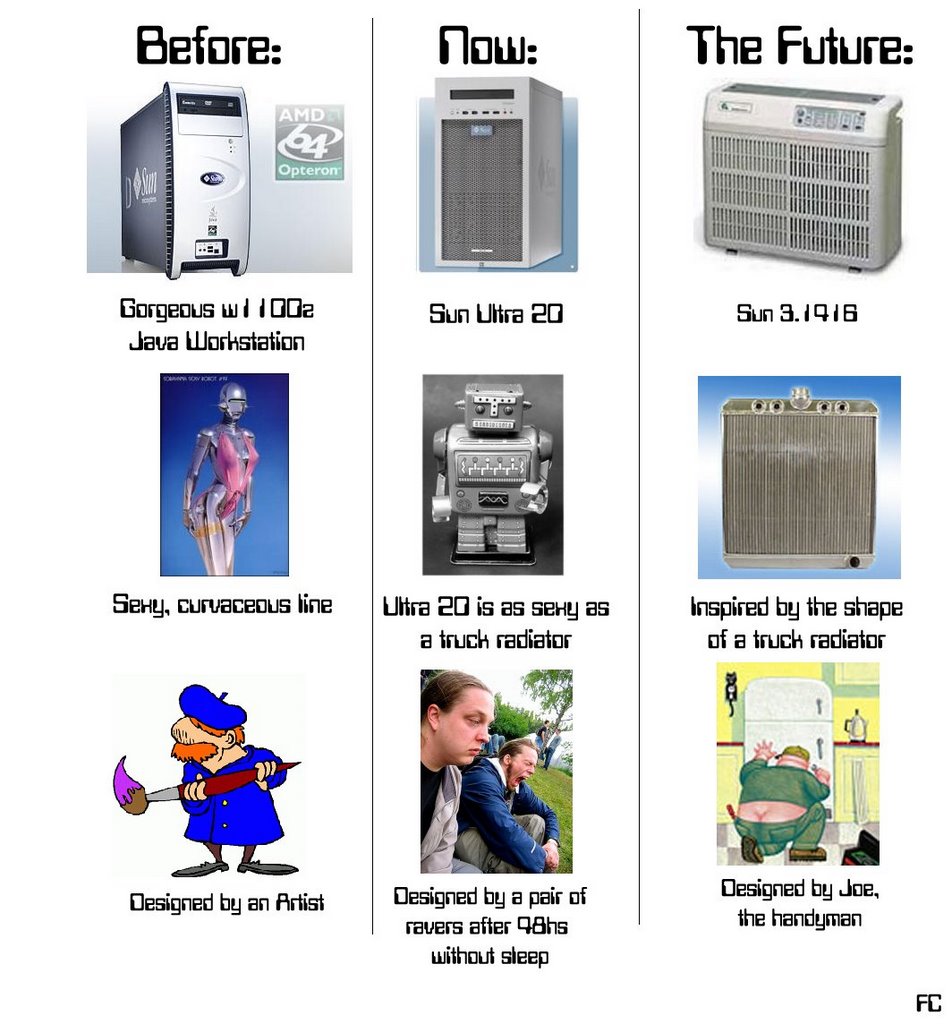
The uglification of the Sun workstation cases. I want the w1100z´s one back!

I don´t know what the Sun hardware engineers were thinking, but if you ask me, the new Sun Ultra 20 workstation has an UGLY case, unlike its predecessor, the w1100z Java Workstation which was beatiful, in my book.

Such attractive hardware specs (AMD Opteron CPU, etc), with such an ugly case, WHY OH WHY??.

And I´m not the only one who thinks so.... Floyd Marinesc and others at TheServerSide, said:
"It is amazing to me how consistently ugly Sun workstations look in comparison. They must work hard to maintain such standards. The irony I find in this is that I will pay more for good industrial design. (I'm typing this on my Powerbook G4.) I wish Sun would respond to my want to pay more."

I think the w1100z case was beatiful in comparison to the new Ultra 20´s case design.

I hope the Sun guys have a sense of humour, because this is how I predict the Ultra 20´s succesor will look like, given the current trend: :-)

[Click to enlarge]
[Click on the image to enlarge it]

Thursday, April 21, 2005

Do the Math: Intel Snaps Sun's "Open Source Diva"

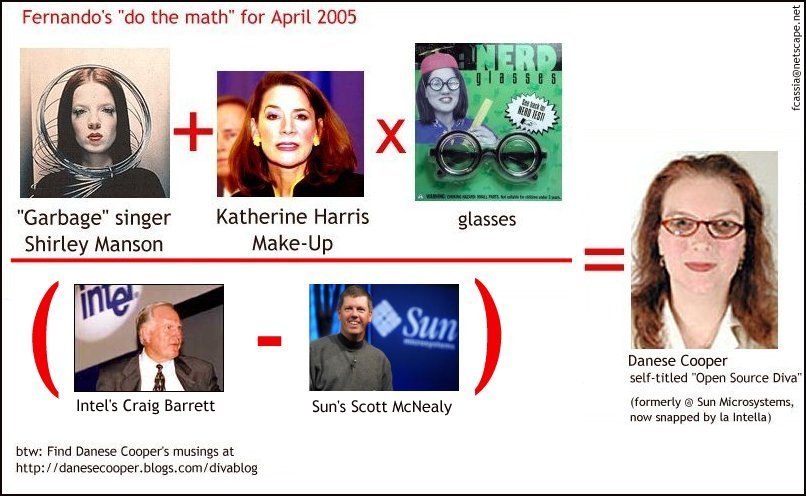
In case some of you were wondering why Intel Corp snapped Danese Cooper, formerly Sun Microsystems' Open Source Diva, here's the answer. Like always, a simple mathemetical equation shows us the answer:


^Click on the image to zoom it.

Congratulations once again to Danese for her great sense of humour!.

Do the Math: Danese Cooper, open source Diva

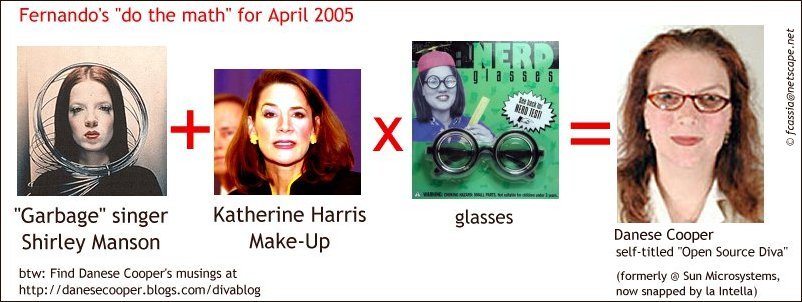
I will start a new, hopefully new section with this post, dubbed: "Do the Math". The goal?. Explain both people´s origins and also company moves with simple mathematic equations. Well, sort of. At least these equations are much more fun for me to create than working with "real" math!. ;)

Today, we will see who is the "Open Source Diva" that until recently worked at Sun Microsystems. In the spirit of discordance, I will always try to e-mail the works to the equation target before publishing it -if possible-. In this case, Danese Cooper took it humorously and seemed to enjoy it, saying "LOL...Yes, that old pic really did get overused. I liked it so much better than the sterile ones Sun PR had made for me, though. At least
I looked awake, you know!".

So, my kudos to Danese Cooper for her great sense of humour!.
After this tiresome introduction, here´s for you.... April´s

Do the Math: Danese Cooper


^click on the image to zoom it